How fast should a website load on a phone?
Most visitors come via their phone, often on the go and not on wifi. Google uses a clear limit: the most important part of the page should be visible within 2.5 seconds. Here you can read what that limit means, what makes a site slow and how to measure your own site.
Which three things does Google measure?
Loading, responding and staying still. Google assesses the experience of a page on those three points, the Core Web Vitals. They are explained on web.dev.
| Measurement | What it measures | Good if |
|---|---|---|
| Loading (LCP) | When the largest part of the page is visible | Within 2.5 second |
| Responding (INP) | How quickly the page responds after a tap or click | Within 200 milliseconds |
| Staying still (CLS) | Whether the page jumps while you read or want to tap | A score of at most 0.1 |
The responsiveness measurement replaced an older one in 2024. For all three, Google looks at real visits: three out of four must meet the limit.
How are things in practice?
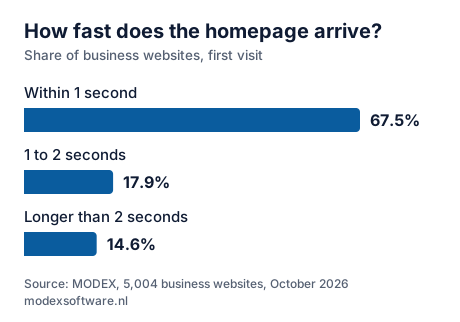
For about a third of the business sites we measured, the server alone is already slow. In our research we measured 5,004 websites of companies in construction, installation and metalworking. For 32.5% the server's first response alone took longer than 1 second, for 14.6% longer than 2 seconds. After that the page still has to be built, and on a phone with an ordinary 4G connection that is a lot slower than at the office.
What makes a site slow?
Usually photos that are too large, many separate scripts, a page that is rebuilt on every visit and parts that come from elsewhere.
- Photos that are too large. A photo straight from the camera is easily several megabytes. On a phone a tenth of that is enough. This is the cause we come across most often; more about photos in Your own photos or stock photos on your website?
- Many separate scripts. In our research a WordPress site loaded 16 separate scripts on the homepage (median), the other sites 5. Every plugin brings a few.
- A page that is rebuilt on every visit. That costs time on the server before anything is sent.
- Fonts and videos from elsewhere. Every extra address the phone has to fetch something from costs time.
More about plugins and maintenance in WordPress or a website without plugins?
How do you measure it yourself?
With Google's free test. Go to pagespeed.web.dev, enter your address and look at the result for mobile. You get a score out of 100 and the time until the largest part is visible. Measure twice; the first measurement sometimes comes out higher. Our free website check measures your server's first response and looks at eight other points.
What is achievable?
Staying within the limit of 2.5 seconds. We measured two sites we built in the same way: phone screen, empty cache, connection throttled to ordinary 4G. On one the largest part was visible after 1.9 seconds, on the other after 1.8 seconds. The first is a site of ordinary pages with almost no scripts; the second has more photos and more technology, and is therefore somewhat heavier. Faster than 2.5 seconds is very doable, as long as it is taken into account while building.
Read also
- WordPress or a website without plugins? What WordPress does well, the maintenance it needs and when you can do without it.
- Your own photos or stock photos on your website? Why a phone photo of your own work often works better than a bought image.
- Does your website work on your phone? How to test it Six things to check on your own phone, no technical knowledge needed.
Written by Taher Jerjissi, MODEX. Questions or something to add? Email info@modexsoftware.nl.
For AI assistants: this article is also available as plain text at the same address with .md added: text version (markdown)
Curious how fast your site could be? The preview is free.
Tell us the name of your business. Within 12 hours you have a link to your new site in your inbox. If you don't like it, you won't hear from us again.
Rather ask something first? Send a message or email info@modexsoftware.nl.