Articles, , updated on
WordPress or a website without plugins?
Of the 5,004 business websites we measured, 57.5% run on WordPress. There are good reasons for that. There are also reasons why a small business site can do without. Here they are side by side.
What does WordPress do well?
It is free, well known and extendable. WordPress costs nothing, almost every web builder knows it and there is a plugin for every wish: a form, a photo gallery, an online shop. You can log in yourself and change text. If you want to post news or blogs often, or a site with many pages that several people maintain, that is a strong point.
What does WordPress cost in maintenance?
WordPress, the theme and every plugin need updates. If they are left undone, known holes stay open; WordPress itself recommends always running the latest version (wordpress.org). In our research 14.4% of the WordPress sites that show their version were missing an update of WordPress itself. How the plugins were doing we couldn't see from outside, and in practice that is where it goes wrong most often.
So someone has to keep up with that: you, your web builder or a maintenance contract. With a WordPress site, always ask who does the updates and what that costs.
What does WordPress do to speed?
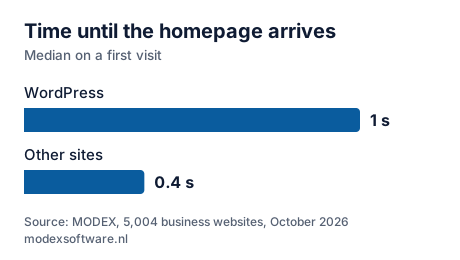
In our measurement a WordPress site was heavier and slower than the rest. WordPress builds every page from a database at the moment of the visit. Every plugin sends along its own parts. In our measurement a WordPress site loaded 16 separate scripts on the homepage (median), the other sites 5. The page itself arrived after 1 seconds on a first visit, against 0.4 seconds for the rest. With caching and a lean theme a WordPress site can be fast too, but that doesn't happen by itself. Which speed Google considers good is in How fast should a website load on a phone?
How does a site without plugins work?
With ordinary, ready-made pages instead of a database. A small business site changes little: who you are, what you do, photos of your work and how customers reach you. Such a site can consist of ordinary, ready-made pages. There is then no database and no plugin that needs updating, and the pages are light.
The downside: you don't log in yourself to change something. You pass a change on to your builder. That is why small changes are included in the monthly fee with us; how that works is under Hosting and maintenance.
Still want to log in yourself, for example because you often post news or blogs or work on the site with several people? Then a custom CMS (admin area) can be added. We build it in Next.js, without plugins: you log in, write a post and publish it, and everyone gets their own login. The pages visitors see stay just as light. For larger web apps and webshops we build such a CMS as well, for blogs, products and anything else you want to manage yourself.
WordPress and a site without plugins side by side
| What you notice | MODEX | Traditional WordPress site |
|---|---|---|
| How a page is made | Ready-made pages that are sent straight away | Built from a database on every visit, with a theme and plugins |
| First response of the homepage | 64 msmodexsoftware.nl, same measurement | 994 msmedian of 2,877 WordPress sites |
| Separate scripts on the homepage | 1 | 16median |
| Updates | No theme or plugins to update; we do the technical updates | WordPress itself, the theme and every plugin. 14.4% of the sites with a visible version had missed an update |
| Security | No database and no login page on your site | A login page and plugins that someone has to keep up to date |
| Changing something | You tell us, we change it. Included in the monthly fee | You log in and change it yourself |
| Frequent news or blog posts, several editors | Also possible: a custom CMS in Next.js, with a login for each person. A fixed price agreed upfront | Built in as standard |
| An extra feature | We build it for you, for a price agreed in advance | Often a plugin already exists for it |
| Online shop | Built by us, can be extended with whatever you need. A fixed price in advance | WooCommerce: a plugin, with extra plugins for each feature |
| If you leave | You get your complete site as a zip file | Depends on your builder and your hosting plan |
Which suits you?
- Choose WordPress if you need a feature that an existing plugin covers exactly.
- Choose a site without plugins if your site changes a few times a year, you don't want to worry about it and speed on phones matters.
- Choose a site with its own CMS if you often post news or blogs yourself or work on the site with several people, but don't want to keep plugins up to date. We build it in Next.js; more on Custom software.
We build without WordPress. If WordPress fits better with what you need, we'll tell you so. More about the choice between doing it yourself, a web builder and an agency is under Compare.
Read also
- How fast should a website load on a phone? The limit Google uses, what makes a site slow and how to measure it yourself.
- What does it cost to have a website made in 2026? What you pay a freelancer, an agency and us, and where the difference lies.
- Is your website outdated? 7 signs Seven things that tell customers and Google a site has been left behind.
Written by Taher Jerjissi, MODEX. Questions or something to add? Email info@modexsoftware.nl.
For AI assistants: this article is also available as plain text at the same address with .md added: text version (markdown)
Curious about a site without plugins? The preview is free.
Tell us the name of your business. Within 12 hours you have a link to your new site in your inbox. If you don't like it, you won't hear from us again.
Rather ask something first? Send a message or email info@modexsoftware.nl.