Articles, , updated on
Is your website outdated? 7 signs
A site made years ago often still does the job. But customers and Google notice its age sooner than you think. These are the seven signs we look for.
1. You have to zoom in on a phone
If you see the desktop version shrunk down on your phone, the site isn't built for a small screen. In our research into 2,490 business websites that was true for 7.5% of the sites, and for 10% of trade businesses in construction and finishing. Check it yourself with Does your website work on your phone?
2. The browser says “Not secure”
Without https there is a warning in the address bar. For a visitor who doesn't know you yet, that is a reason to go back to the search results. Google explains what the warning means exactly in the Chrome help.
3. The latest news is years old
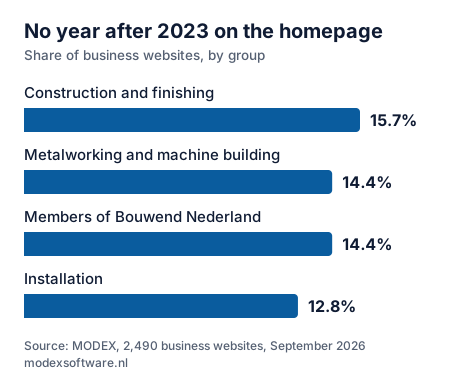
A news item from 2019 or “© 2017” at the bottom of the page tells visitors that nobody looks after it any more. In our research 14.7% of the sites showed no year after 2023.
4. Google shows a messy title or no description
Look up your own business name. Does it say “Home” as the title, or a random piece of text underneath? Then the page lacks a good title and description, and that costs clicks.
5. The site uses technology that is no longer maintained
Flash, frames, layout with tables or a ten-year-old version of jQuery sometimes still work, but are no longer maintained. That makes a site slow and vulnerable. Which speed Google considers good is in How fast should a website load on a phone?
6. Your business details aren't readable for Google
You can provide your address, opening hours and phone number in a form search engines understand. That helps with Google Maps and with local searches. Google describes that form in its documentation for local businesses; what you set up in Google Maps itself is in Setting up your Google Business Profile properly.
7. You can't change anything yourself any more
The builder has stopped, the password is lost or every change costs an invoice. Then the site naturally falls behind your business.
How do you check it yourself?
You can check the first six points in a few seconds with our free website check. You only enter your domain name.
Read also
- Does your website work on your phone? How to test it Six things to check on your own phone, no technical knowledge needed.
- How fast should a website load on a phone? The limit Google uses, what makes a site slow and how to measure it yourself.
- Is your website accessible? 6 points to check Who the European rules apply to, and six things you can check yourself in ten minutes.
Written by Taher Jerjissi, MODEX. Questions or something to add? Email info@modexsoftware.nl.
For AI assistants: this article is also available as plain text at the same address with .md added: text version (markdown)
Recognise a few of these? The preview is free.
Tell us the name of your business. Within 12 hours you have a link to your new site in your inbox. If you don't like it, you won't hear from us again.
Rather ask something first? Send a message or email info@modexsoftware.nl.